
Cleanup: Phone Storage Cleaner
Deep Flow AppsTools
4.47.55K Reviews
- Version
- 1.4.7
- Installs
- 10.00M
- Age Rating
- Everyone
Screenshots

Our Review of Cleanup: Phone Storage Cleaner
 Analysis by Appyee
When my phone’s storage starts filling up, I want to know what is taking space before I start deleting things. That is the practical appeal of Cleanup: Phone Storage Cleaner: it is a free tools app from Deep Flow Apps focused on clearing clutter, finding duplicate photos, and making room on the device. I see its most useful role as a guided housekeeping tool, especially for people who would rather review suggestions than hunt through folders on their own.
Why duplicate-photo cleanup can make a difference
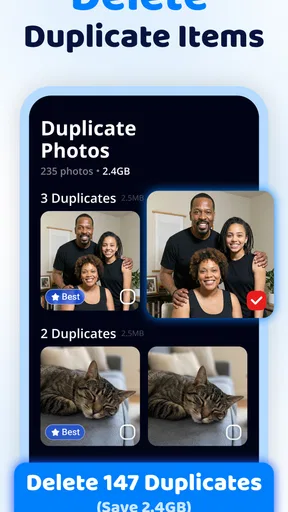
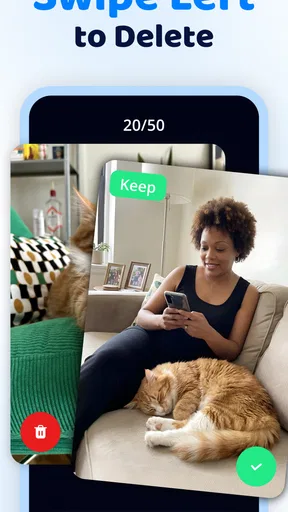
Photos are an easy place for clutter to build up. A burst of similar shots, repeated saves, or several versions of an image can make a camera library harder to manage as well as consume storage. Cleanup’s duplicate-photo function is useful because it turns that chore into a review task: look through the matches, decide what you want to keep, and remove copies you do not need.
That review step matters. Two pictures that appear alike may still capture different expressions, focus, or moments, so I would not treat every suggested match as disposable. My practical tip is to work in small batches and keep the clearest or most meaningful version before deleting anything. This is a better fit for someone who wants help spotting repetition, not for someone expecting an app to make every personal choice safely on their behalf.
A more deliberate way to reclaim phone space
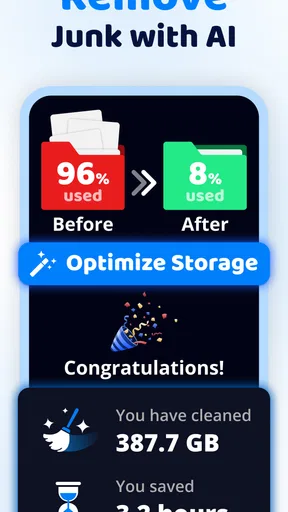
The app’s stated purpose also includes removing junk and optimizing memory and storage. I would approach those jobs as separate decisions rather than pressing a broad cleanup button without checking what it will change. Storage is about files and available room; memory concerns what the device is using while it runs. Knowing which problem you are trying to solve helps set realistic expectations and makes it easier to judge whether a cleanup has actually helped.
How I would use it in everyday life
Imagine getting a low-storage warning just before taking pictures at a family gathering. Instead of deleting the first large folder you see, you could open the cleaner, inspect duplicate-photo suggestions, and remove only the extra copies you recognize. Then you can consider the junk-cleaning recommendations separately. That sequence protects the photos you care about while still addressing the immediate need for space.
I would also make this a routine rather than an emergency ritual: review clutter after a trip, a long event, or a period of frequent photo-taking, when duplicates are easiest to recognize. Doing it in short sessions reduces the chance of rushing through a list and removing something valuable. If you are unsure about an item, keeping it is the safer choice; a few extra files are less costly than losing a photo you cannot recreate.
Where it fits among the usual options
Most phones already offer built-in storage controls, and those are often the best first stop for checking what categories are using space. A file manager gives more direct control but can require more manual sorting. This cleaner is most compelling when the job is specifically finding photo duplicates or getting a guided pass over clutter. It is less necessary if you already maintain your files carefully and are comfortable using the phone’s own tools.
There is a trade-off between convenience and control. A dedicated cleaner can make potential targets easier to review, but any recommendation still needs your judgment. I would compare the space it proposes to clear with the actual content on screen, especially for photos or files that may look redundant but have personal value. For routine maintenance, the app can save effort; for a one-off, highly sensitive cleanup, manual review may be preferable.
What to expect before installing
The app is rated for Everyone and is available without an upfront price, while offering in-app purchases priced from $6.99 to $39.99 per item. I would try the free experience first and decide whether its workflow is useful before considering any purchase. The listing shows a 4.5 average from around 22 thousand ratings, with over 1 million installs, which suggests it has reached a sizable audience but does not guarantee that every device or cleanup session will feel the same.
It is currently at version 1.0.5 and requires Android 11 or later. That makes the operating-system requirement an important first check: if your phone runs an older version, this is not the right option. The release date is November 21, 2025, so I would also treat the app as a relatively new utility rather than assuming it has a long track record across every Android setup.
What a careful cleanup looks like
Before removing anything, I would check that the items selected are genuinely duplicates or expendable clutter, then review the final selection before confirming. For photos, keep the best-quality or most complete image rather than choosing only by thumbnail. For broader junk cleanup, pay attention to the categories presented and skip anything you cannot identify. This approach is a little slower, but it makes the tool more trustworthy in practice because you remain in charge of what disappears.
Another useful habit is to check storage again after a cleanup rather than judging success by a progress animation or a general feeling that the phone is faster. If the pressure comes from a few large videos or downloads, duplicate-photo removal may not address the main cause. In that case, the phone’s storage settings or a file manager can help locate the real space users. Cleanup works best when its suggestions match the kind of clutter you actually have.
Who is likely to benefit most
I would recommend trying it if your photo library has become difficult to sort, you regularly save the same image more than once, or you want a guided way to review potential junk. It can be particularly handy for people who are comfortable making the final keep-or-delete decision but do not want to search manually for every repeated picture. Its focused cleanup approach is easier to justify when storage pressure returns often.
I would skip it if you rarely run short of space, already use your phone’s built-in cleanup tools effectively, or prefer complete manual control over every file. It is also not a substitute for deciding what you truly want to keep: automated suggestions cannot know which nearly identical photo has sentimental value. If your main issue is a specific large download or a collection of videos, start with storage settings or a file manager instead of expecting a duplicate cleaner to solve everything.
A balanced recommendation
In my view, Cleanup: Phone Storage Cleaner is best treated as a convenient assistant for a particular chore, not as a reason to clean the phone indiscriminately. Its duplicate-photo workflow can make an untidy library easier to review, while its broader cleanup purpose gives users another way to approach storage clutter. The strongest result comes from slowing down, checking the proposed items, and keeping control of every deletion.
If you want a guided option for reviewing repeated photos and clutter, it is worth considering, especially if you are using Android 11 or newer and are happy to inspect suggestions yourself. If you want a tool that guarantees a speed or battery improvement, or you would rather not review cleanup choices, I would look elsewhere or stick with your phone’s built-in controls. Used thoughtfully, this app can make a recurring storage chore more manageable without turning it into a risky sweep.
Features That Stand Out
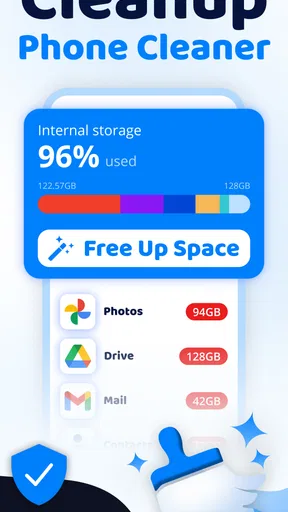
The app offers a variety of features that are designed to optimize your device. One of my favorite features is the junk file cleaner. It scans and removes all those pesky hidden files that hog your storage without you even knowing. I was amazed at the amount of space I managed to free up.
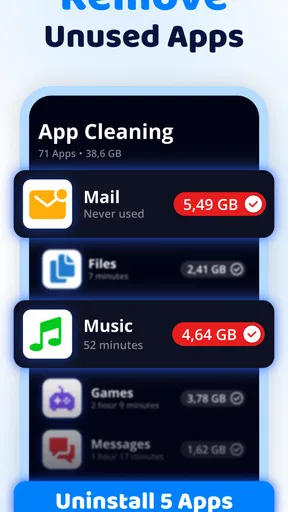
Another cool feature is the app manager. You can see all installed applications, and it even suggests which ones you might want to uninstall based on usage. It’s like having a smart assistant that reads your mind. I cleared out apps I hadn’t touched in months, and my phone felt so much lighter.
Performance Boost
After a quick cleanup, my phone’s performance noticeably improved. Apps opened faster, and I didn’t have to deal with annoying lags anymore. It’s a game-changer, especially if you, like me, have a habit of hoarding apps and photos.
Battery Life Savior
One unexpected benefit of using this app was the improvement in battery life. By cleaning up background apps and processes, my phone’s battery now lasts much longer. It's like magic – but real!
Some Handy Extras
- Battery Saver: This feature optimizes your battery usage by identifying and shutting down apps that are draining power unnecessarily.
- Duplicate Photos Cleaner: Perfect for those who take way too many selfies. It finds and helps you delete duplicate images, freeing up even more space.
Once I installed it, the first thing that struck me was its user-friendly interface. It’s sleek, intuitive, and doesn’t bombard you with unnecessary options. Just open the app, and you're greeted with a simple dashboard that guides you in cleaning up your phone in mere minutes.
Overall, it’s a lifesaver for anyone looking to keep their phone in tip-top shape. With its easy-to-use interface and powerful features, it’s like giving your phone a much-needed spa day. Plus, it’s free to download, so why not give it a shot?
So, if your phone is feeling sluggish and cluttered, I’d definitely recommend trying out this app. It's a simple solution to a common problem, and you might just fall in love with your phone all over again.
Privacy and Permissions
See what permissions an app requests and how it handles your data.
- Contacts
- read your contacts, modify your contacts
- Photos/Media/Files
- read the contents of your USB storage, modify or delete the contents of your USB storage
- Storage
- read the contents of your USB storage, modify or delete the contents of your USB storage
- Wi-Fi connection information
- view Wi-Fi connections
- Other
- view network connections, full network access, run at startup, control vibration, prevent device from sleeping, Google Play license check
Verdict
Strengths of Cleanup: Phone Storage Cleaner
- User-friendly interface, easy navigation.
- Quick scans free up space efficiently.
- Customizable cleaning options available.
- Supports multiple languages for accessibility.
- Minimal impact on battery life.
Limitations of Cleanup: Phone Storage Cleaner
- Contains ads in the free version.
- Occasional false positives on large files.
- Limited features without premium upgrade.
- Requires frequent updates for optimal performance.
- May not support older device models.
Other Releases by Deep Flow Apps
View All
Learn English, Spanish: Learna
Education4.6

IQ Masters - Brain Games
Education4.2

Nerd AI - Tutor & Math Helper
Education4.6

Retake AI: Face & Photo Editor
Photography3.7
Similar Picks in This Category
View All
Google LLC4.0

Gboard - the Google Keyboard
Google LLC4.5

Google Play services
Google LLC4.3

Google Play Store
Google LLC4.9

Files by Google
Google LLC4.5

SHAREit: Transfer, Share Files
Smart Media4U Technology Pte.Ltd.4.3
Frequently Asked Questions
What features does Cleanup: Phone Storage Cleaner offer?
Cleanup: Phone Storage Cleaner provides a comprehensive set of features to optimize your device. It includes junk file removal, cache clearing, duplicate photo detection, and large file management. The app also offers a performance booster to enhance your phone’s speed and battery life, making it a versatile tool for maintaining your device.
Is Cleanup: Phone Storage Cleaner easy to use for beginners?
Yes, Cleanup: Phone Storage Cleaner is designed with user-friendliness in mind. It features a straightforward interface with easy-to-navigate menus and one-tap cleaning options. Even if you're new to phone optimization apps, you'll find it simple to use, with guidance provided throughout the cleaning process.
Does Cleanup: Phone Storage Cleaner support both Android and iOS devices?
Cleanup: Phone Storage Cleaner is available for both Android and iOS platforms. It is designed to leverage the capabilities of each operating system, ensuring optimal performance and compatibility. Users can download it from the Google Play Store or Apple App Store, depending on their device.
Are there any potential drawbacks to using Cleanup: Phone Storage Cleaner?
While Cleanup: Phone Storage Cleaner is effective, some users might find the in-app advertisements slightly intrusive. Additionally, certain advanced features may require a premium subscription. However, for most basic cleaning needs, the free version is quite sufficient and highly functional.
Is it safe to use Cleanup: Phone Storage Cleaner on my device?
Yes, Cleanup: Phone Storage Cleaner is safe to use. It has been thoroughly tested for security and privacy, ensuring that your data remains protected. The app does not delete important files without user consent, and it provides options for reviewing items before removal.
